The Future of Website Creation: AI, No-Code Tools, and Beyond
Introduction
Web creation is changing fast. What once demanded a developer, designer, and weeks of coding now often takes hours using AI and no-code tools. But speed alone is not the story. The future blends human strategy with machine assistance to build sites that are accessible, fast, and conversion-focused. This step-by-step guide shows how to plan, design, build, launch, and grow a modern website—leveraging AI and no-/low-code without losing quality.

Step 1: Get crystal-clear on purpose and audience
Decide what “success” means (leads, sales, sign-ups, demos) and who you’re serving. Write a one-page brief: goals, primary audience, top tasks users must complete, and a single core promise. This anchors every choice you’ll make.

Step 2: Pick your creation path (AI, no-code, low-code, custom)
AI site generators: fastest way to a first draft; great for landing pages and quick MVPs.
No-code builders: visual design + CMS without programming; ideal for marketers and creatives.
Low-code frameworks: extend visuals with snippets for unique logic.
Custom code: best for complex apps, heavy integrations, or strict performance needs.
Choose the lightest approach that still meets your requirements.
Step 3: Map the structure and user journeys
Sketch a simple sitemap (Home → Key Pages → Support Pages) and outline 2–3 priority journeys, e.g., “Visitor → Pricing → Checkout.” AI can help propose page outlines, FAQs, and CTAs based on your audience, but keep final control to ensure accuracy and tone.

Step 4: Build a lean design system
Create a mini system with colours, typography, spacing, buttons, and card components. Many builders now suggest palettes and layouts with AI—use them as a starting point, not a rule. Consistency reduces design debt and improves accessibility.
Step 5: Draft content with AI, then edit for substance
Use AI to generate headlines, value propositions, hero copy, and meta descriptions. Replace generic phrasing with your proof (metrics, testimonials, case studies). Keep paragraphs short, add scannable subheads, and ensure every page has a single clear CTA.

Step 6: Assemble pages visually (components over pixels)
Drag-and-drop sections: hero, features, testimonials, pricing, blog, and contact. Reuse components so updates propagate everywhere. Connect a CMS for blogs or resources. For unique interactions (quoting tools, calculators), layer in low-code widgets.
Step 7: Automate forms, CRM, and workflows
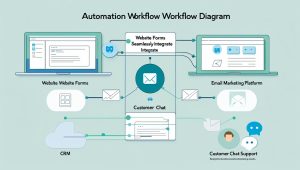
Hook forms to your CRM/Email tool, trigger welcome sequences, and push leads to pipelines. Use AI chat or assistants for first-line FAQs, but set escalation to human support. For e-commerce, plug in payments, inventory, and tax automation early.
Step 8: Ship performance, accessibility, and SEO by default
Performance: compress images, lazy-load media, minify assets, and use a CDN.
Accessibility: semantic headings, proper contrast, focus states, alt text.
SEO: fast pages, descriptive titles/meta, structured data where relevant, internal links.
Run automated checks, then manually test on real devices.
Step 9: Launch softly, then iterate with data
Publish a staging version to a small audience first. Set up analytics, heatmaps, and event tracking (sign-ups, clicks, scroll depth). Use AI-assisted A/B testing to refine headlines, hero imagery, CTAs, and pricing layout. Keep what lifts conversions; discard the rest.

Step 10: Maintain, govern, and scale
Create an update cadence (monthly content refresh, quarterly audits). Document who owns content, design, and tech. As traffic grows, consider edge rendering, image CDNs, and caching rules. Keep your component library tidy so new pages stay consistent.

Conclusion
The future of website creation isn’t “AI vs. humans”—it is humans setting strategy while AI and no-/low-code tools accelerate execution. Start with clear goals, design a simple system, draft with AI then human-edit, assemble with reusable components, automate operations, and iterate with data. Do this, and you’ll launch faster today—and maintain a site that keeps getting smarter tomorrow.